

RAPIDS: Accelerating Data with GPU
GPU-Powered Data Science: From Local Setups to Cloud Deployments

Imagine being a data scientist at a leading telecom provider's Network Operations Center (NOC), responsible for analyzing billions of network logs and performance metrics to identify potential outages and optimize network performance. Traditional CPU-based processing might take hours or even days to process such massive datasets, leaving your network vulnerable to downtime and slow response times. What if you could detect anomalies and predict network congestion in minutes or even seconds?
Enter NVIDIA RAPIDS, a transformative suite of open-source software libraries and APIs that harness the power of NVIDIA GPUs to accelerate data science and analytics pipelines. By shifting the computational workload from CPUs to GPUs, RAPIDS achieves unprecedented speed and scalability, transforming how data scientists and software engineers work in a Telecom NOC and enabling faster, data-driven decisions to ensure network reliability and performance.
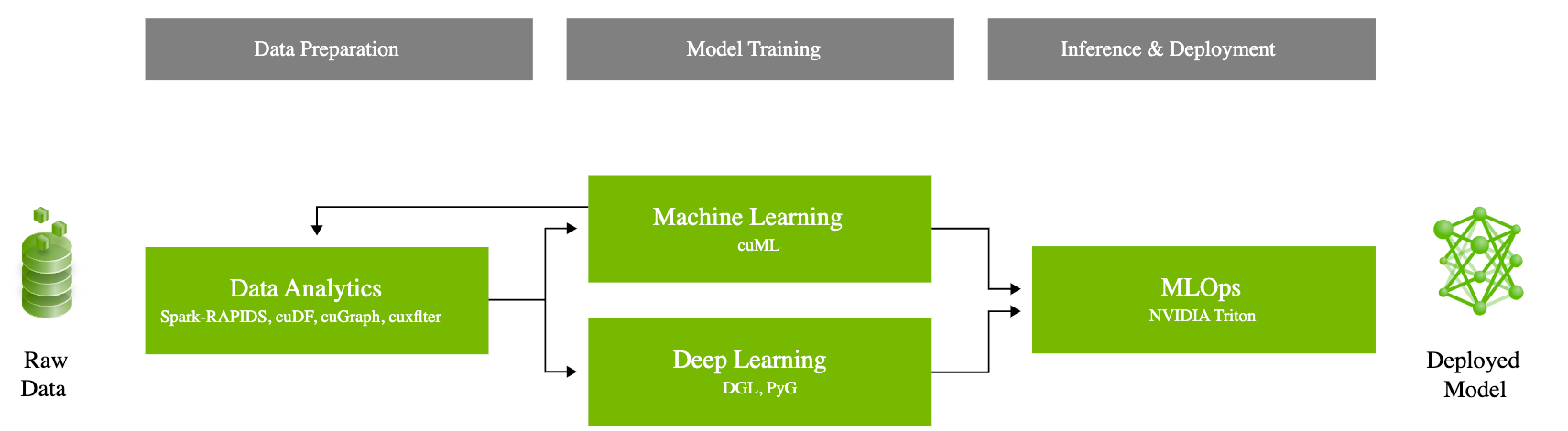
What is RAPIDS?
RAPIDS is an ecosystem of GPU-accelerated libraries and tools that enables end-to-end data science and analytics on NVIDIA GPUs. It integrates seamlessly with popular Python data science frameworks, allowing users to leverage their existing skills and workflows. RAPIDS encompasses several core libraries:
cuDF: GPU DataFrame library similar to pandas, providing high-performance data manipulation.
cuML: GPU-accelerated machine learning algorithms, offering drop-in replacements for scikit-learn.
cuGraph: GPU-based graph analytics library for efficient graph processing and analytics.
How Does RAPIDS Work?
RAPIDS harnesses the power of NVIDIA GPUs and CUDA to turbocharge data processing, machine learning, and deep learning tasks. By offloading computationally intensive tasks to the GPU, RAPIDS achieves remarkable speedups of 10-50x compared to CPU-based processing. Its seamless integration with libraries like Dask enables distributed computing across multiple GPUs and nodes, empowering large-scale, high-performance data science workflows.
Moreover, RAPIDS leverages CUDA for optimized memory management, providing a Python API for direct interaction with GPU memory. This eliminates data transfer overhead between CPU and GPU, further amplifying computational efficiency and streamlining data processing pipelines.
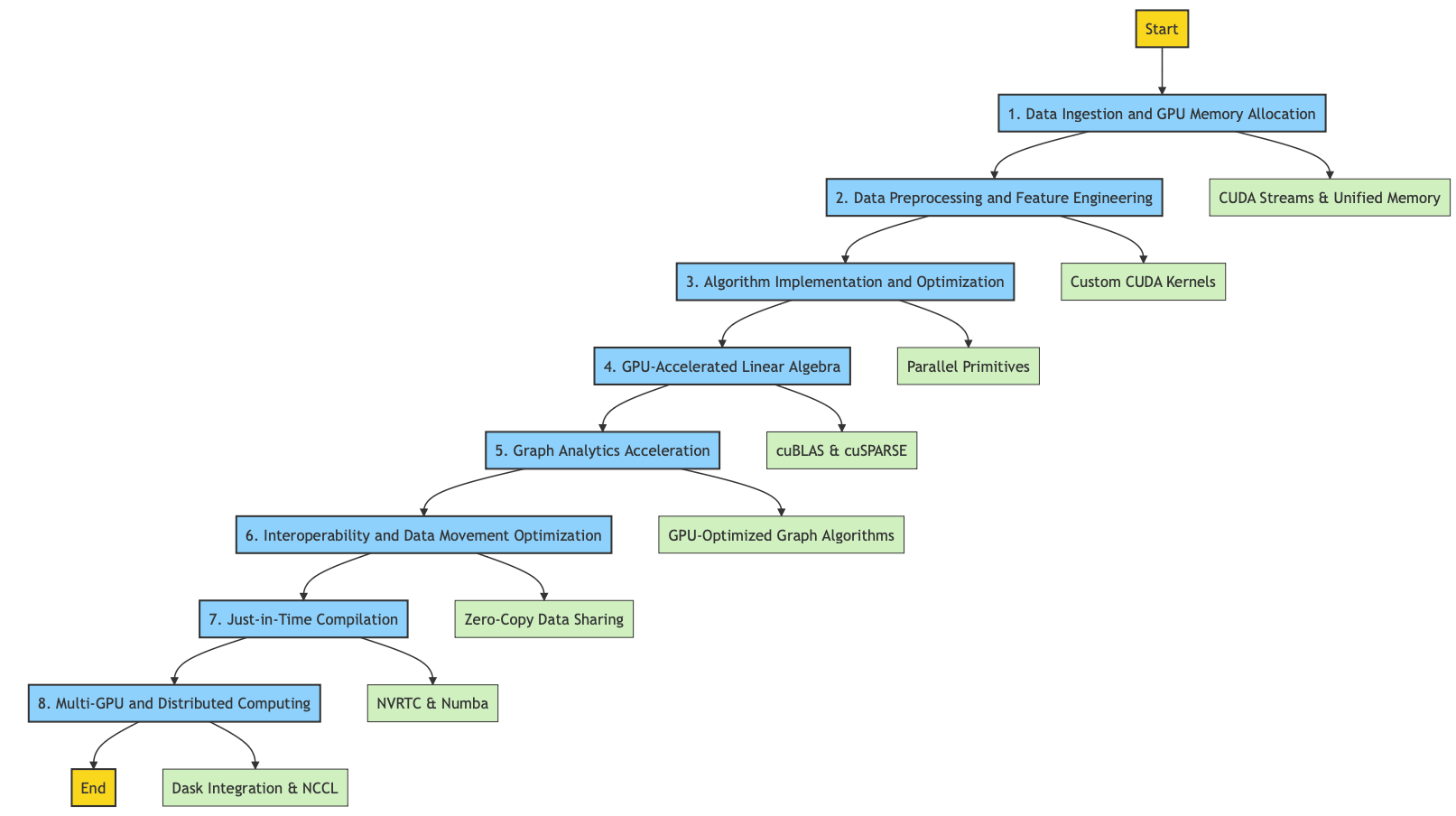
RAPIDS Acceleration
Data Ingestion and GPU Memory Allocation:
Asynchronously transfers data from CPU to GPU using CUDA streams
Employs memory pooling and CUDA Unified Memory for efficient memory management
Data Preprocessing and Feature Engineering:
Custom CUDA kernels for filtering, aggregation, and other operations
Optimized for coalesced memory access and reduced global memory transactions
Algorithm Implementation and Optimization:
Reimplements machine learning algorithms using parallel primitives
Techniques like data tiling, warp-level primitives, and shared memory usage
GPU-Accelerated Linear Algebra:
Interfaces with optimized libraries like cuBLAS and cuSPARSE
Techniques like matrix tiling, shared memory usage, and register-level optimizations
Graph Analytics Acceleration:
Represents graphs using Compressed Sparse Row (CSR) or other GPU-friendly formats
Parallel graph primitives and work distribution techniques
Interoperability and Data Movement Optimization:
Zero-copy data sharing between GPU processes using CUDA IPC
Asynchronous, overlapped transfers using pinned memory and CUDA streams
Just-in-Time Compilation:
Dynamic CUDA kernel generation using NVRTC
Compiles Python functions to GPU code using Numba's CUDA target
Multi-GPU and Distributed Computing:
Custom algorithms for data partitioning and result aggregation
Integrates with Dask for task scheduling and data movement across nodes
Uses NCCL for efficient multi-GPU communication
Overall, RAPIDS leverages various techniques and libraries to optimize data processing, algorithm implementation, and data movement for GPU acceleration, enabling faster and more efficient data analytics and machine learning workflows.
Key Features and Advantages
GPU Acceleration: Leverages the parallel processing capabilities of GPUs, often providing 10-100x faster performance than CPU-based implementations.
Scalability: Supports scaling data science workflows across multiple GPUs and machines, handling larger datasets and more complex models efficiently.
Seamless Integration: Integrates smoothly with the Python data science ecosystem (e.g., pandas, NumPy, scikit-learn), enabling easy GPU acceleration with minimal code changes.
Enhanced Iteration and Experimentation: Faster computations allow for more iterations and quicker prototyping, improving the overall quality of data science models and solutions.
Key Use Cases for RAPIDS
RAPIDS accelerates a broad spectrum of data science tasks, from NLP to real-time analytics and graph processing. Here’s how RAPIDS can transform various applications:
1. Large-scale Text Processing and Natural Language Processing (NLP)
RAPIDS provides GPU-accelerated text vectorization methods like Count Vectorizer, TF-IDF, and Hashing Vectorizer, essential for converting text data into numerical formats required for machine learning models. Integration with libraries like spaCy and Hugging Face enhances these capabilities for NLP tasks.
Example Use Cases:
Real-time sentiment analysis on social media posts for brand perception monitoring.
Topic modeling and document clustering for large-scale news articles or research papers.
Named entity recognition and part-of-speech tagging on extensive corpora for language understanding.
2. Machine Learning and Data Analytics at Scale
RAPIDS accelerates machine learning workflows by enabling them to scale across multiple GPUs and distributed environments using Dask. It includes GPU-accelerated versions of popular machine learning algorithms like XGBoost, KMeans, and Random Forest.
Example Use Cases:
Training gradient-boosted decision trees (GBDT) for large-scale fraud detection in financial transactions.
Logistic regression and random forest models for predictive maintenance in manufacturing.
Accelerated clustering algorithms for market segmentation and customer profiling.
3. Real-time Stream Processing
Optimized for handling high-throughput data streams, RAPIDS integrates with Apache Kafka to provide real-time processing capabilities where latency is critical.
Example Use Cases:
Real-time sentiment analysis on social media streams for crisis management.
Video processing and object detection in surveillance or autonomous vehicle applications.
Anomaly detection in IoT sensor data for early warning systems in smart cities.
4. Computer Vision Tasks
RAPIDS supports GPU-accelerated computer vision tasks, such as image recognition, object detection, and video analysis, and can be integrated with libraries like TensorRT for optimized model deployment.
Example Use Cases:
Object detection and tracking in live video feeds for autonomous vehicles or drone navigation.
Facial recognition systems for security and access control in sensitive environments.
Image classification for automated tagging and categorization in large media libraries.
5. Data Preprocessing and Feature Engineering
RAPIDS offers GPU-accelerated libraries for data cleaning, transformation, and feature extraction, which are crucial steps in preparing data for machine learning models.
Example Use Cases:
Handling missing data, scaling, normalization, and encoding categorical variables in large datasets.
Dimensionality reduction techniques such as PCA for high-dimensional feature spaces in genomic data analysis.
Feature extraction from raw text, image, or time-series data for subsequent modeling.
6. Graph Analytics
RAPIDS cuGraph offers GPU-accelerated implementations of graph algorithms for analyzing complex network structures. It supports libraries like NetworkX for scalable graph analytics.
Example Use Cases:
PageRank and community detection in social network analysis for identifying influencers or communities.
Fraud detection in financial networks by identifying abnormal patterns and anomalies.
Network optimization and routing in telecommunications or transportation networks.
Implementation Guide: End-to-End Pipeline for NLP
Let's walk through the process of setting up and using RAPIDS for an end-to-end pipeline for text classification using RAPIDS. This example demonstrates leveraging GPU acceleration from data loading to model training and evaluation.
Instructions to Use the Code Block in Jupyter Notebook
Copy the below code block into a cell in your Jupyter Notebook.
Run the cell. This will execute the bash script within the notebook environment.
%%bash

# Setup script for installing libraries and configuring the environment for RAPIDS and CUDA

# Check for conda installation
if ! command -v conda &> /dev/null; then
    echo "Conda could not be found. Please install Anaconda or Miniconda first."
    exit 1
fi

# Create a new Conda environment for RAPIDS
ENV_NAME="rapids_env"
CUDA_VERSION="11.5"  # Adjust this based on your CUDA version

echo "Creating a new conda environment: $ENV_NAME"
conda create -y -n $ENV_NAME python=3.9

# Activate the environment
echo "Activating the conda environment: $ENV_NAME"
source $(conda info --base)/etc/profile.d/conda.sh
conda activate $ENV_NAME

# Add conda-forge channel
echo "Adding conda-forge channel."
conda config --add channels conda-forge
conda config --set channel_priority strict

# Install RAPIDS libraries using the rapidsai channel
echo "Installing RAPIDS libraries..."
conda install -y -c rapidsai -c nvidia -c conda-forge \
    cudf=23.06 cuml=23.06 dask-cudf=23.06 \
    python=3.9 cudatoolkit=${CUDA_VERSION}

# Install additional libraries
echo "Installing additional required libraries..."
pip install scikit-learn

# Set environment variables for CUDA
echo "Setting environment variables for CUDA..."
export PATH=/usr/local/cuda/bin:$PATH
export LD_LIBRARY_PATH=/usr/local/cuda/lib64:$LD_LIBRARY_PATH

# Ensure that environment variables are set for future sessions
echo "export PATH=/usr/local/cuda/bin:\$PATH" >> ~/.bashrc
echo "export LD_LIBRARY_PATH=/usr/local/cuda/lib64:\$LD_LIBRARY_PATH" >> ~/.bashrc

# Confirm installation
echo "Environment setup complete."
echo "To activate the environment, use: conda activate $ENV_NAME"
Example Code
from cuml.feature_extraction.text import TfidfVectorizer
from cuml.naive_bayes import MultinomialNB
from cuml.metrics import accuracy_score, classification_report
from cuml.model_selection import train_test_split
from cuml.decomposition import PCA
import cudf
import dask_cudf  # For parallel and distributed data processing
import cupy as cp
import numpy as np

# Check if a GPU is available
def check_gpu_availability():
    try:
        cp.cuda.runtime.getDevice()
        print("GPU is available.")
    except cp.cuda.runtime.CUDARuntimeError as e:
        print(f"GPU check failed: {e}")
        raise RuntimeError("No GPU available. Please check your environment.")

# Ensure RAPIDS library compatibility
def check_rapids_version():
    import cuml
    import cudf
    rapids_version = cuml.__version__
    if rapids_version < '23.06':
        raise EnvironmentError(f"Incompatible RAPIDS version: {rapids_version}. Please update to 23.06 or later.")
    print(f"RAPIDS version {rapids_version} is compatible.")

# Validate the data type and shape of input/output data
def validate_data_format(data, expected_type, name='Data'):
    if not isinstance(data, expected_type):
        raise TypeError(f"{name} type mismatch. Expected {expected_type}, but got {type(data)}.")
    if isinstance(data, (cp.ndarray, cudf.DataFrame)):
        print(f"{name} format validated: {type(data)}, shape: {data.shape}")
    else:
        print(f"{name} format validated: {type(data)}")

# Convert data to dense format if necessary
def convert_to_dense(matrix):
    if hasattr(matrix, 'todense'):
        return matrix.todense()
    return matrix

# Handle potential empty or invalid data scenarios
def handle_empty_data(X, y):
    if X.size == 0 or y.size == 0:
        raise ValueError("Input data is empty after preprocessing. Please provide valid data.")
    if X.shape[0] != y.shape[0]:
        raise ValueError("Mismatch between the number of samples in X and y.")
    print("Data validation complete. Proceeding with processing...")

# Main processing pipeline
def main():
    # Check environment setup
    check_gpu_availability()
    check_rapids_version()

    # Load network log data in parallel using dask_cudf for scalability
    try:
        log_data = dask_cudf.read_csv('network_logs.csv').compute()  # Convert to cudf after loading
        if log_data.empty:
            raise ValueError("The CSV file is empty. Please provide a valid dataset.")
    except Exception as e:
        print(f"Error loading CSV file: {e}")
        return

    # Ensure the required columns are present
    required_columns = ['log_message', 'severity']
    if not all(col in log_data.columns for col in required_columns):
        raise ValueError(f"Missing required columns: {required_columns}. Found columns: {log_data.columns}")

    # Preprocess data: extract relevant columns, handle missing values
    X = log_data['log_message'].fillna('').to_cupy()  # Convert to CuPy array for better GPU processing
    y = log_data['severity'].fillna('Unknown').to_cupy()

    # Validate initial data
    validate_data_format(X, cp.ndarray, name='X')
    validate_data_format(y, cp.ndarray, name='y')

    # Handle potential empty or invalid data scenarios
    handle_empty_data(X, y)

    # Split data into training and testing sets using GPU accelerated splitting
    X_train, X_test, y_train, y_test = train_test_split(X, y, test_size=0.2, random_state=42)

    # TF-IDF Vectorization with CUDA Streams
    vectorizer = TfidfVectorizer(max_features=5000, output_type='cupy')  # Ensure output is in CuPy format

    # Create CUDA streams
    stream1 = cp.cuda.Stream()
    stream2 = cp.cuda.Stream()

    # Perform vectorization concurrently
    with stream1:
        X_tfidf_train = vectorizer.fit_transform(X_train)

    with stream2:
        X_tfidf_test = vectorizer.transform(X_test)

    # Synchronize streams to avoid race conditions
    stream1.synchronize()
    stream2.synchronize()

    # Validate TF-IDF output
    validate_data_format(X_tfidf_train, cp.sparse.csr_matrix, name='X_tfidf_train')
    validate_data_format(X_tfidf_test, cp.sparse.csr_matrix, name='X_tfidf_test')

    # Convert sparse matrices to dense format where necessary
    X_tfidf_train_dense = convert_to_dense(X_tfidf_train)
    X_tfidf_test_dense = convert_to_dense(X_tfidf_test)

    # Validate conversion to dense format
    validate_data_format(X_tfidf_train_dense, cp.ndarray, name='X_tfidf_train_dense')
    validate_data_format(X_tfidf_test_dense, cp.ndarray, name='X_tfidf_test_dense')

    # Dimensionality reduction using PCA with batched processing
    pca = PCA(n_components=0.95, output_type='cupy')  # Ensure output is in CuPy format
    batch_size = 500  # Adjust batch size based on GPU memory

    # Batched PCA transformation
    X_pca_train = []
    X_pca_test = []

    for i in range(0, len(X_tfidf_train_dense), batch_size):
        X_pca_train.append(pca.fit_transform(X_tfidf_train_dense[i:i+batch_size]))
    X_pca_train = cp.concatenate(X_pca_train)

    for i in range(0, len(X_tfidf_test_dense), batch_size):
        X_pca_test.append(pca.transform(X_tfidf_test_dense[i:i+batch_size]))
    X_pca_test = cp.concatenate(X_pca_test)

    # Validate PCA output
    validate_data_format(X_pca_train, cp.ndarray, name='X_pca_train')
    validate_data_format(X_pca_test, cp.ndarray, name='X_pca_test')

    # Train Naive Bayes model with stream-based training
    nb_stream = cp.cuda.Stream()
    nb = MultinomialNB()

    with nb_stream:
        nb.fit(X_pca_train, y_train)
    nb_stream.synchronize()  # Ensure completion of training

    # Predict and evaluate
    y_pred = nb.predict(X_pca_test)

    # Validate prediction output
    validate_data_format(y_pred, cp.ndarray, name='y_pred')

    # GPU-accelerated accuracy and classification report
    accuracy = accuracy_score(y_test, y_pred)
    print(f"Accuracy: {accuracy}")
    print(classification_report(y_test, y_pred))

if __name__ == "__main__":
    main()
NVIDIA RAPIDS Setup on AWS and GCP
To leverage cloud GPU instances for RAPIDS, follow these refined steps:
AWS Setup:
EC2 Instance: Launch an EC2 instance with an NVIDIA GPU (e.g.,
p3.2xlargeorg4dn.xlarge).NVIDIA NGC Containers: Use NGC containers for secure, pre-configured environments. This avoids manual configuration and ensures compatibility.
Install RAPIDS with Conda:
conda create -n rapids-23.06 -c rapidsai -c nvidia -c conda-forge cudf=23.06 cuml=23.06 cupy=9.6 python=3.9 cudatoolkit=11.8Security and Networking: Configure IAM roles, security groups, and firewall rules for secure and efficient access.
GCP Setup:
VM Instance: Create a GCP instance with an NVIDIA GPU (e.g., NVIDIA Tesla T4 or V100).
Use NGC Containers for RAPIDS setup and configuration.
Install RAPIDS Libraries via Conda as shown above.
Monitor and Logging: Use Cloud Monitoring (Stackdriver) for GPU utilization and performance.
Example: Reading Data from Amazon S3 using RAPIDS
Here’s a streamlined example for reading and processing data directly from S3:
import cudf
import s3fs
import logging
import boto3
import numpy as np
from concurrent.futures import ProcessPoolExecutor, as_completed
import os

# Set up logging with structured format
logging.basicConfig(level=logging.INFO, format='%(asctime)s - %(levelname)s - %(message)s')
logger = logging.getLogger(__name__)

# Define constants
BUCKET_NAME = 'your-bucket'
FILE_PATH = 'your-file.csv'
S3_PATH = f's3://{BUCKET_NAME}/{FILE_PATH}'

# Create a filesystem object
s3 = s3fs.S3FileSystem(anon=False)

def verify_aws_credentials():
    """
    Verifies AWS credentials and checks access to the specified S3 bucket.
    """
    try:
        boto3.client('s3').head_bucket(Bucket=BUCKET_NAME)
        logger.info('AWS credentials verified successfully')
    except boto3.exceptions.S3UploadFailedError as e:
        logger.error(f'AWS credentials verification failed: {e}')
        raise
    except boto3.exceptions.NoCredentialsError as e:
        logger.error(f'No AWS credentials found: {e}')
        raise

def read_csv_from_s3(s3_path):
    """
    Reads a CSV file directly from S3 using cuDF with efficient memory management.

    Args:
        s3_path (str): The S3 path of the CSV file.

    Returns:
        cudf.DataFrame or None: Returns a cuDF DataFrame if read successfully, None otherwise.
    """
    try:
        logger.info(f'Reading CSV file from S3: {s3_path}')
        return cudf.read_csv(s3_path, chunksize=10**6)  # Read in chunks to reduce memory usage
    except FileNotFoundError:
        logger.error(f'File not found: {s3_path}')
        return None
    except Exception as e:
        logger.error(f'An error occurred while reading CSV from S3: {e}')
        return None

def perform_operations(df):
    """
    Performs groupby and mean operations on the DataFrame.

    Args:
        df (cudf.DataFrame): The DataFrame to process.

    Returns:
        cudf.DataFrame or None: Returns a DataFrame after performing the operations, None if an error occurred.
    """
    try:
        logger.info('Performing groupby and mean operations')
        return df.groupby('column', as_index=False).mean()
    except Exception as e:
        logger.error(f'An error occurred during processing: {e}')
        return None

def process_chunks_concurrently(chunks):
    """
    Processes chunks concurrently using multiple processes.

    Args:
        chunks (iterator): An iterator of cuDF DataFrame chunks.

    Returns:
        cudf.DataFrame: Concatenated results of all processed chunks.
    """
    results = []
    max_workers = min(4, os.cpu_count())  # Adjust max_workers based on available resources
    logger.info(f'Starting concurrent processing with {max_workers} workers')

    with ProcessPoolExecutor(max_workers=max_workers) as executor:
        futures = {executor.submit(perform_operations, chunk): chunk for chunk in chunks}
        for future in as_completed(futures):
            chunk = futures[future]
            try:
                result = future.result()
                if result is not None:
                    results.append(result)
                logger.info('Processed a chunk successfully.')
            except Exception as e:
                logger.error(f'An error occurred while processing a chunk: {e}')

    return cudf.concat(results) if results else cudf.DataFrame()

def main():
    """
    Main function to verify AWS credentials, read a CSV file from S3, and perform groupby operations.
    """
    try:
        verify_aws_credentials()
        chunks = read_csv_from_s3(S3_PATH)
        if chunks is not None:
            logger.info('Reading chunks and starting processing...')
            result = process_chunks_concurrently(chunks)
            if not result.empty:
                logger.info('Processing complete. Printing the result:')
                print(result)
            else:
                logger.warning('No data processed. Result is empty.')
        else:
            logger.error('Failed to read CSV from S3. No chunks to process.')
    except boto3.exceptions.Boto3Error as e:
        logger.error(f'An AWS-related error occurred: {e}')
    except Exception as e:
        logger.error(f'An unexpected error occurred: {e}')

if __name__ == '__main__':
    main()
Conclusion
NVIDIA RAPIDS offers a powerful toolkit for data scientists, software engineers, and machine learning practitioners, enabling them to leverage GPU acceleration for a wide range of tasks. By significantly reducing computation time and supporting larger-scale data processing, RAPIDS opens up new possibilities for data science and machine learning applications.
As the field of data science continues to evolve, tools like RAPIDS will play an increasingly important role in handling the growing scale and complexity of data-driven tasks. For the latest updates and more detailed examples, refer to the official RAPIDS GitHub repositories: cuDF, cuML, cuGraph.
By following these refined steps and incorporating RAPIDS into your workflows, you can achieve significant performance gains, enhanced scalability, and faster time-to-market for your data-driven solutions.
P.S:
Here are some other code examples, articles, and references on how to use RAPIDS
Code Examples:
RAPIDS Examples Repository:
https://github.com/rapidsai/rapids-examplescuDF 10 Minutes to cuDF Tutorial:
https://docs.rapids.ai/api/cudf/stable/user_guide/10min.htmlcuML Estimator Intro Notebook:
https://github.com/rapidsai/cuml/blob/branch-23.08/notebooks/estimator_intro.ipynbcuGraph Easy Path Tutorial:
https://github.com/rapidsai/cugraph/blob/branch-23.08/notebooks/tutorials/EasyPath.ipynb
Articles:
Introduction to RAPIDS - GPU Data Science:
https://developer.nvidia.com/blog/introduction-rapids-gpu-data-science/Accelerating and Scaling Data Science with RAPIDS:
https://developer.nvidia.com/blog/accelerating-and-scaling-data-science-with-rapids/NLP and Text Processing with RAPIDS:
https://developer.nvidia.com/blog/nlp-and-text-precessing-with-rapids-now-simpler-and-faster/Accelerating Data Science Workflows with cuDF:
https://medium.com/rapids-ai/accelerating-data-science-workflows-with-cudf-b09f21b89a97
Other References:
RAPIDS Documentation:
cuDF API Reference:
https://docs.rapids.ai/api/cudf/stable/cuML API Reference:
https://docs.rapids.ai/api/cuml/stable/cuGraph API Reference:
https://docs.rapids.ai/api/cugraph/stable/RAPIDS Community Forums:
https://forums.developer.nvidia.com/c/accelerated-computing/data-science/rapids/
These resources provide a comprehensive overview of RAPIDS usage, from basic tutorials to advanced applications across different RAPIDS libraries.
Sample Network Logs:
timestamp,source,subsystem,request_id,severity,latency_ms,log_message
2025-08-30 10:01:23,router-1,routing,req-0001,INFO,12,Route lookup successful
2025-08-30 10:01:24,auth-service,auth,req-0002,WARNING,240,High login latency detected
2025-08-30 10:01:25,db-cluster,storage,req-0003,ERROR,0,Database connection timeout
2025-08-30 10:01:26,app-server-2,compute,req-0004,CRITICAL,5100,Unresponsive thread pool detected
2025-08-30 10:01:27,orchestrator,scheduler,req-0005,INFO,32,Service restarted successfully
Synthetic Data Generator ( Python Script)
import pandas as pd
import numpy as np
import random
import datetime
import logging
import os

logging.basicConfig(level=logging.INFO,
                    format="%(asctime)s - %(levelname)s - %(message)s")

SEVERITIES = ["INFO", "WARNING", "ERROR", "CRITICAL"]
SOURCES = ["router-1", "router-2", "auth-service", "db-cluster",
           "app-server-1", "app-server-2", "orchestrator", "load-balancer"]
SUBSYSTEMS = ["routing", "auth", "storage", "compute", "scheduler", "network"]
MESSAGES = [
    "Route lookup successful",
    "High login latency detected",
    "Database connection timeout",
    "Unresponsive thread pool detected",
    "Service restarted successfully",
    "Packet loss observed on uplink",
    "Memory pressure on node",
    "Heartbeat missed from peer"
]

def generate_logs(n_rows=100_000, start_time=None):
    if not start_time:
        start_time = datetime.datetime.now()

    rows = []
    for i in range(n_rows):
        ts = start_time + datetime.timedelta(milliseconds=i*50)  # 20 logs/sec
        row = {
            "timestamp": ts,
            "source": random.choice(SOURCES),
            "subsystem": random.choice(SUBSYSTEMS),
            "request_id": f"req-{i:06d}",
            "severity": random.choices(SEVERITIES, weights=[0.7, 0.15, 0.1, 0.05])[0],
            "latency_ms": np.random.exponential(scale=200),  # realistic latency distribution
            "log_message": random.choice(MESSAGES)
        }
        rows.append(row)
    return pd.DataFrame(rows)

def main(output_file="network_logs.csv", n_rows=100_000):
    logging.info(f"Generating {n_rows} synthetic network log rows...")
    df = generate_logs(n_rows=n_rows)
    logging.info(f"Writing logs to {output_file}...")
    df.to_csv(output_file, index=False)
    logging.info(f"Completed: {os.path.abspath(output_file)}")

if __name__ == "__main__":
    main(n_rows=500_000)  # half a million logs for stress testing
where is an example network_logs CSV file please?